How To Roll Your Own Auth

Every few business days, someone on this internet says “good luck rolling your own auth” as though building login for a web app were an act of reckless ambition.
In these tellings, authentication is not normal web engineering. It is treated like a specialist domain that ordinary builders should not touch directly, best left to vendors, consultants, and whoever sounds most certain in the room.
Calm down. You are not building your own cryptography. You are not inventing a hash function. You are not designing a new security standard. You are building login for a web application. That is serious work, yes, but it is also ordinary work. The modern JavaScript ecosystem has managed to turn basic web architecture into something more intimidating than it needs to be, and authentication is one of the biggest examples.
So let us do something apparently rebellious: let us explain auth without panic or ten venture-backed abstractions. And yes, let us roll our own auth. By that I mean let us use battle-tested primitives, framework support, strong password hashing, secure cookies, server-side sessions, and the smallest possible amount of unnecessary complexity.
First, let us stop mixing up authentication and authorization
NIST defines authentication as the process by which a claimant proves possession and control of one or more authenticators bound to an account. This confusion alone has probably funded a few startup valuations. In normal human language, authentication answers one question: who are you?
Authorization is a different question entirely. NIST defines authorize as the decision to grant access by evaluating a subject’s attributes. In normal human language, authorization answers this: what are you allowed to do?
That distinction sounds small until a team ignores it and spends the next six months building confusion into their app. Logging in with email and password is authentication. Deciding whether that logged-in user can delete another user’s post is authorization. Proving you are Kelvin is authentication. Deciding whether Kelvin gets the admin screen is authorization. If you mix the two together, the rest of the conversation gets harder than it needs to be.
What “roll your own auth” should and should not mean
When sensible people say “do not roll your own auth,” what they usually mean is not controversial. They mean do not invent your own crypto, do not store passwords in plaintext, do not improvise token formats, and do not ignore the boring security details because the UI came out nice. On that much, we are in full agreement.
What the ecosystem often hears, however, is something much stranger. It hears never implement authentication in your own application, outsource identity immediately, dismiss cookies as outdated, and add JWTs before you have users, revenue, or a coherent reason. That leap is absurd.
OWASP stands for the Open Web Application Security Project. Developers should care because it is one of the most practical, widely trusted sources for how web apps actually get broken and how to stop helping attackers by accident.
OWASP’s Authentication Cheat Sheet and Session Management Cheat Sheet do not say “give up and buy SaaS.” They explain the mechanics you are responsible for handling well.
And for most normal full-stack web apps, those mechanics are not mystical. They are a user record, a password hash, a login form, a session, a cookie, route protection, logout, and maybe password reset.
If your application genuinely benefits from MFA, magic links, passkeys, or OAuth, add them. But none of this is evidence that ordinary builders are forbidden from understanding the system they run. That work is not trivial. It is also not impossible. There is a big difference between respecting security and mystifying it.
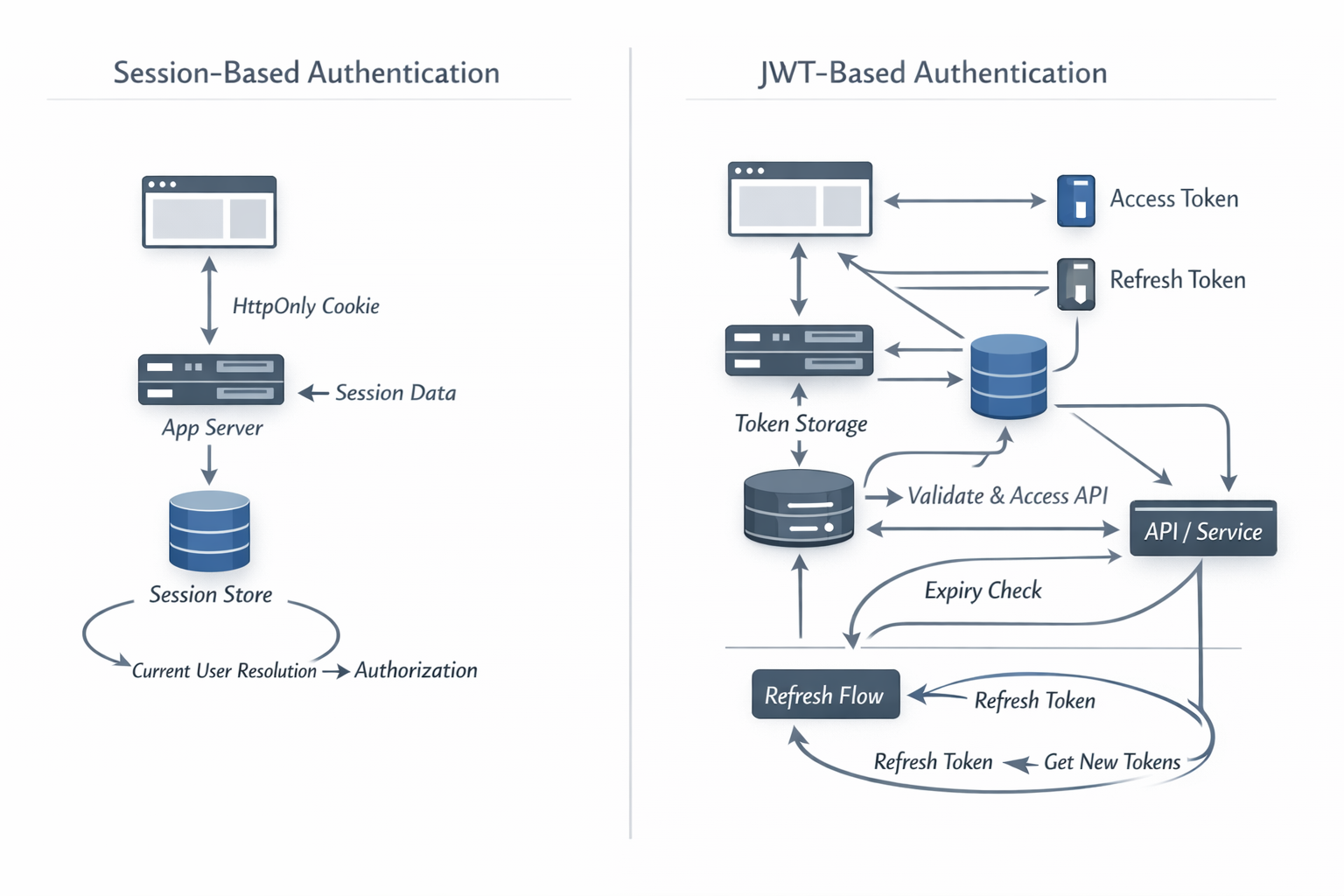
Most web apps do not need JWTs for login
Let me say the controversial part plainly.
Most web apps should be full-stack. Most full-stack web apps do not need a separate public API for their own frontend. And if your app does not need that API, it usually does not need JWTs for normal browser login either.
I have written before that it’s client-server not client/server. The browser asks. The server answers. The server renders or returns what is needed. That is the native architecture of the web, not some embarrassing relic we need to apologize for every time someone starts talking about statelessness.
RFC 7519 defines JWT as a compact, URL-safe means of representing claims to be transferred between parties. That is a useful standard. It is a real standard. It is also just a format. It is not the only respectable way for your server to remember that Mary signed in five minutes ago.
JWTs make sense in real scenarios: federation and single sign-on, third-party APIs, mobile clients using bearer tokens, service-to-service identity assertions, and systems where detached claims are genuinely useful. Excellent. Use them there.
But if your app is mostly a browser talking to your own server and your own server talking back to the browser, then a server-side session is usually simpler, clearer, and more honest about the problem you are solving.
If you put the JWT in localStorage, you have introduced a fresh set of XSS concerns while preserving your sense of architectural sophistication.
OWASP’s session guidance notes that localStorage persists across browsing sessions and is not required to be encrypted at rest. That does not make it unusable, but it should at least stop people from talking about browser storage as though it solves more than it does.
If, instead, you put the JWT in an HttpOnly cookie, then you are back where you started. You are now dealing with cookie transport, cookie security, CSRF, expiry, revocation, and session-like behavior anyway. In other words, many teams have rebuilt a session-oriented system with extra nouns and more paperwork.
CSRF stands for Cross-Site Request Forgery. Developers should care because it is what happens when a browser is tricked into sending an authenticated request to your app from some other site, simply because the browser included the user’s cookie. The simplest way to think about it is this: your browser submits a form you did not intend to submit, but your app sees a valid cookie and cannot tell the difference unless you add protections. The answer is not panic. The answer is to protect state-changing requests with tools like SameSite cookies, CSRF tokens, and origin checks where appropriate.
So what is session-based auth?
Session-based auth is the server remembering you. That is basically it.
HTTP is stateless. Every request arrives without built-in memory of what happened before. OWASP’s Session Management guidance points out that modern web apps need a way to retain information about a user across requests. That retained context is the session.
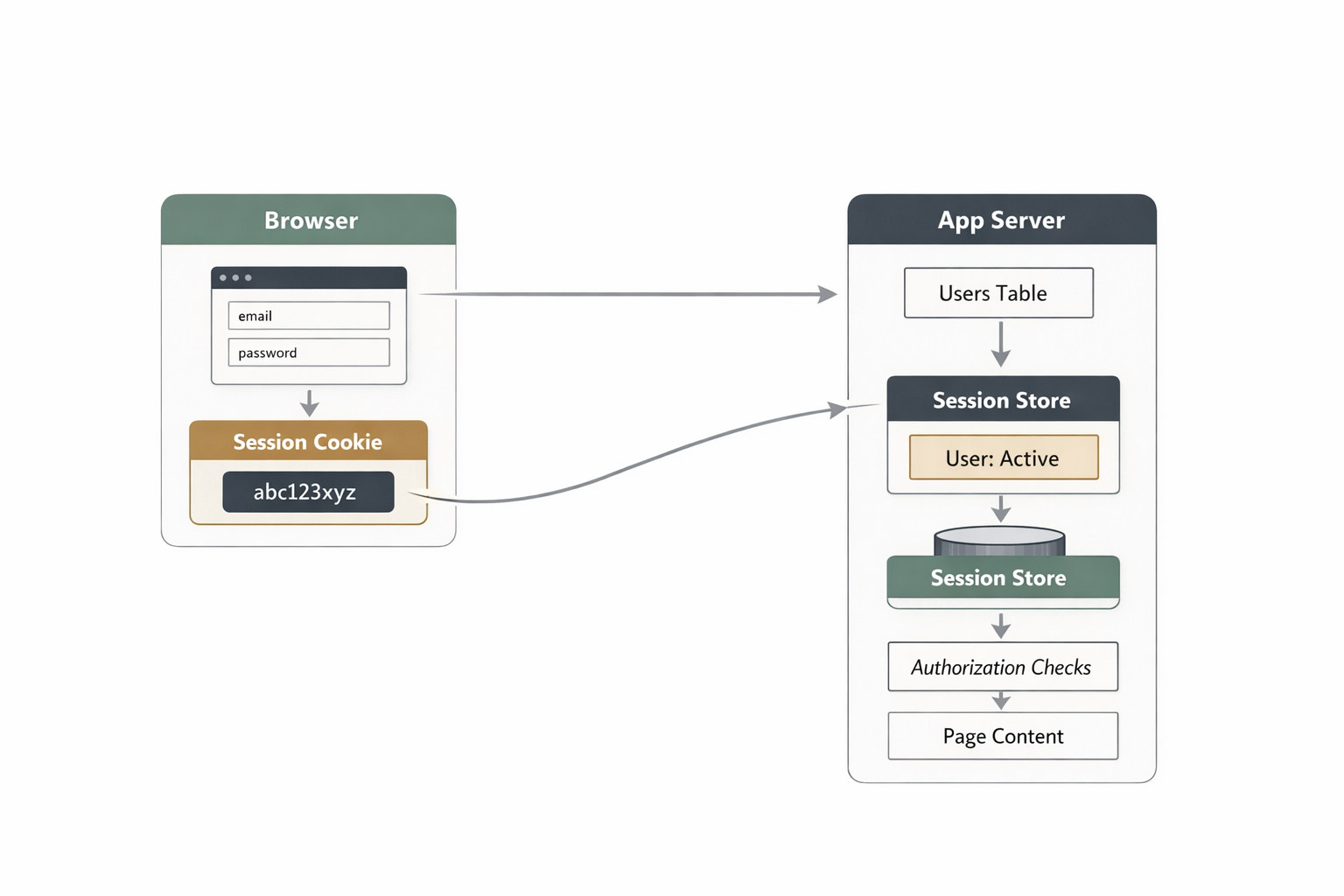
In practice, the flow is simple:
- The user logs in with something that proves identity.
- The server verifies it.
- The server creates a session record.
- The browser receives a session cookie.
- On later requests, the browser sends the cookie back.
- The server looks up the session, finds the user, and continues.
The browser does not need the whole truth. It usually carries an opaque identifier, while the server stores the meaningful state. That is why session auth is called stateful: the state lives on the server side. The browser holds the session ID. The server holds the session data.
If you want the shortest version, it is this:
cookie -> session id -> server-side session store -> current user -> authorization checks
That is the flow.
What the cookie is actually doing
Cookies have suffered from being dragged into too many terrible conversations. A cookie is not automatically evil. A cookie is a transport mechanism.
MDN’s cookie docs list session management as one of their primary uses: the server sends a small piece of data to the browser, and the browser sends it back later.
In authentication, that cookie usually carries a session identifier. Not the user’s password. Not a bundle of user data. Just a reference.
Then you secure the cookie properly. Use HttpOnly so JavaScript cannot read it directly. Use Secure so it only travels over HTTPS. Use SameSite=Lax or Strict depending on your flow. Keep Path and Domain tight. Decide how expiry works instead of hoping defaults save you.
MDN’s Set-Cookie reference and OWASP’s session guidance are aligned on this.
So no, the conclusion is not that cookies are outdated. The conclusion is that cookies work well when configured correctly.
A very calm guide to rolling your own auth
1. Create a users table
You need somewhere to store the obvious things: a user ID, email or username, a password hash, verification state, maybe profile fields, and maybe some role information. Nothing revolutionary is happening here. You are making a user model.
2. Hash passwords properly
This is where people should stop being creative. OWASP’s Password Storage Cheat Sheet recommends Argon2id where available, with scrypt as a fallback, and it emphasizes that passwords must remain protected even if the database is compromised.
So never store plaintext passwords, never encrypt them for later recovery, and never write your own password hasher.
It is worth being precise here: a password hash is not the same thing as ordinary encryption at rest. Encryption is designed to be reversible if you have the key. Password hashing is designed to be one-way. You do not store something you plan to decrypt later. You store a derived value that lets you verify a password attempt without keeping the original password around.
That distinction matters because databases leak. Backups leak. Machines get compromised. If an attacker gets your user table, you do not want them holding a neatly recoverable list of passwords. You want them facing properly hashed passwords that are much harder to turn back into something useful. That is the real point of password hashing.
Use the framework or library support that already exists. “Rolling your own auth” should mean assembling proven parts responsibly, not reenacting the prehistory of security engineering in your spare time.
3. Verify credentials on login
The login flow is not mysterious. The user submits an email and password. You find the user by email. You compare the submitted password against the stored hash using the proper verification function. If the check succeeds, you now know who the user is. That is authentication.
In a Sails app using Waterline, the database access is usually that plain:
const user = await User.findOne({ email: email.toLowerCase() })

if (!user) {
  throw 'badCombo'
}

await sails.helpers.passwords.checkPassword(password, user.password)
That is the core of it. Waterline gives you the user record. The password helper checks the submitted password against the stored hash. If the check passes, you know who is signing in.
Notice what you do not know yet: what they are allowed to do. That remains authorization’s job, and life gets much easier when you keep that separation intact.
If you want a concrete example instead of another abstract explanation, the Boring Stack’s Vue-flavored Mellow template shows the pairing cleanly. The login action verifies the password, optionally extends the cookie lifetime for “remember me,” and stores userId in the session. The matching login page posts the form to /login, handles validation errors, and links naturally into the rest of the auth flow.
4. Create a server-side session
Once identity is verified, create a session. OWASP says session IDs should be generated with a cryptographically secure random number generator and should be meaningless on the client side. Perfect. That is exactly what you want.
The browser should not be carrying sensitive business meaning in a cookie. It should be carrying a reference, while the server keeps the real state.
That session record might store:
userId- created time
- last activity
- maybe IP or user-agent metadata if your risk model calls for it
- maybe partial auth state for MFA flows
In development, that store can live in memory. In production, it can live in Redis, a database-backed session store, or whatever stable server-side mechanism fits your stack. The important point is that the state lives on the server, where you can inspect it, revoke it, and reason about it.
5. Send the session cookie
Once the session exists, send the browser the cookie. This is the browser’s reference for subsequent requests. Configure it properly, keep the scope tight, and move on with your life.
MDN and OWASP are not trying to be dramatic here; they are telling you to use HttpOnly, Secure, SameSite, and sensible scoping because that is how you avoid a predictable class of bugs.
This part is not glamorous. That is usually a sign you are standing in the correct part of engineering.
6. Load the current user on each request
Now every request with that cookie can be tied back to a session record. The server loads the session. The session tells you which user is signed in. The server then attaches req.user, req.me, currentUser, or whatever your framework happens to call the same old idea.
From there, the request pipeline gets simple. No session means guest. Valid session means authenticated user. Authenticated user then goes through authorization checks. This is also where session auth shines. The server can make decisions directly instead of letting the browser guess first and wait for the backend to correct it.
7. Do authorization separately
This is the part where you decide whether the authenticated user can view the page, edit the resource, delete the comment, impersonate the account, or access billing.
That is authorization, and it should live in clear policies, guards, or server-side access checks.
In Sails, that often means using policies for broad access rules and action-level checks for resource-specific rules. A route-level policy check can be as plain as this:
// config/policies.js
module.exports.policies = {
  'dashboard/*': 'is-authenticated',
  'billing/*': ['is-authenticated', 'is-admin'],
  'post/update': 'is-authenticated',
}

// api/policies/is-authenticated.js
module.exports = async function (req, res, proceed) {
  if (req.session.userId) return proceed()
  return res.redirect('/login')
}
That gets you through the front door. Then the action still checks whether this specific user is allowed to touch this specific record:
// api/controllers/post/update.js
module.exports = {
  inputs: {
    postId: { type: 'string', required: true },
    title: { type: 'string', required: true },
  },

  fn: async function ({ postId, title }) {
    const post = await Post.findOne({ id: postId })

    if (!post) {
      throw 'notFound'
    }

    if (post.owner !== this.req.me.id) {
      return this.res.forbidden()
    }

    await Post.updateOne({ id: postId }).set({ title })

    return this.res.ok()
  },
}
That is a useful split to keep in your head. Policies answer, “should this request reach the action at all?” The action answers, “now that it got here, can this user operate on this specific thing?”
Do not pour all of this into a JWT and call it architecture. If a user’s privileges change, the server should know. That is one of the underrated strengths of stateful auth: the server is evaluating current truth, not trusting a claim blob minted earlier and still circulating through the frontend after reality has changed.
8. Rotate session identifiers when privilege changes
This is not decorative security. OWASP explicitly recommends renewing the session ID after authentication and after privilege-level changes to help prevent session fixation.
So rotate on login, rotate on privilege elevation, and rotate on sensitive identity changes when appropriate. Do not drag the same session identifier through every trust boundary and then act surprised when you create avoidable risk.
9. Support logout properly
Logout means invalidating or removing the server-side session, clearing the cookie, and ensuring the old session no longer works. It does not mean hiding the button, trusting that tab closure is the same thing as logout, or assuming the browser forgot everything because you did.
Browsers restore sessions. People reuse machines. Reality continues even when the frontend has clocked out.
10. Add the grown-up features when you actually need them
This is where auth gets broader, not necessarily weirder. Depending on your application, you may add email verification, password reset, magic links, passkeys, two-factor authentication, or OAuth.
These are not arguments against understanding auth in your own app. They are simply more features in the same system. Complexity should grow because your needs grew, not because the ecosystem made you feel provincial for having a login form.
Again, if you want to see the boring version in the wild, the password-reset flow in Boring Stack is refreshingly ordinary. The forgot-password action generates a reset token and sends the email, while the forgot-password page handles the request UI. Then the reset-password action verifies the token, updates the password, and logs the user back in, while the reset-password page handles the form and password rules on the UI side.
Why stateful auth is good, actually
There is a strange corner of modern developer culture that treats statefulness as a design failure. I do not share that instinct. Auth is one of the few parts of a system where remembering things is literally the point.
With a session-based system, the server can revoke access immediately, check current roles and permissions, expire idle sessions, invalidate sessions after a password change, store partial login state for MFA, and keep the browser’s responsibility pleasantly small. The browser mostly needs to carry a cookie and stop pretending it is an identity platform.
Yes, the server stores state. Your database also stores state. Your cache stores state. Your application stores state. We do not need to turn “the server remembers the user” into a philosophical crisis.
When JWTs are actually the right tool
I am not anti-JWT. I am anti-defaulting-to-JWT because the ecosystem made you feel unsophisticated without one.
JWTs are appropriate when you genuinely need portable claims. If you are building an API consumed by third parties, doing identity federation, supporting mobile clients with bearer tokens, handling service-to-service communication, or intentionally separating an authorization server from a resource server, then yes, you should reach for the right standards. Think carefully about expiry, audience, issuer, signing, rotation, and revocation, and do the work properly.
What you should not do is force that model onto every full-stack web app whose primary business requirement is “let this person sign in and use the product.” That is how people end up with architecture that photographs well in conference talks and behaves like a nuisance in production.
So, can you roll your own auth?
Yes, if by that you mean using established primitives, leaning on framework support, storing passwords safely, creating server-side sessions, sending secure cookies, separating authentication from authorization, and handling logout, reset, and rotation properly.
No, if by that you mean inventing your own crypto, base64-encoding arbitrary data and calling it a security model, hiding security holes behind TypeScript types, or treating localStorage like a security boundary.
The joke at the center of this whole discourse is that people say “rolling your own auth is hard” while recommending a tower of SaaS, token plumbing, frontend state management, refresh-token rituals, browser-storage debates, and enough configuration to become its own side project.
For many web apps, the calmer path is the more mature one: let the server authenticate, let the server authorize, let the server remember, and let the browser carry a secure cookie.
That is not primitive. That is just using the web as it was built.